WideOpen Garage Guide: Bike Prices, Ranks & Parts
Understand the garage categories and check both cash and career requirements before buying a WideOpen motorcycle. Includes a dated Sport Twin 700 example.
A bike can have two purchase requirements
The purchase popup at 3:28 in ItsChalls’ video, published October 8, shows the Sport Twin 700 at $25,000 with Career Rank 3 / Bronze 3. This is a readable example of checking more than the cash number. Prices and gates may change during beta; confirm the current popup before spending.
| Check | Question to answer before buying |
|---|---|
| Cash price | Is this the vehicle price or a part price? |
| Career requirement | Does my current rank meet the displayed gate? |
| Selected vehicle | Am I looking at the bike I intend to buy? |
| Currency | Is the displayed purchase in cash or Robux? |
| Purchase result | What does the current confirmation say I will receive? |
What the garage menu contains
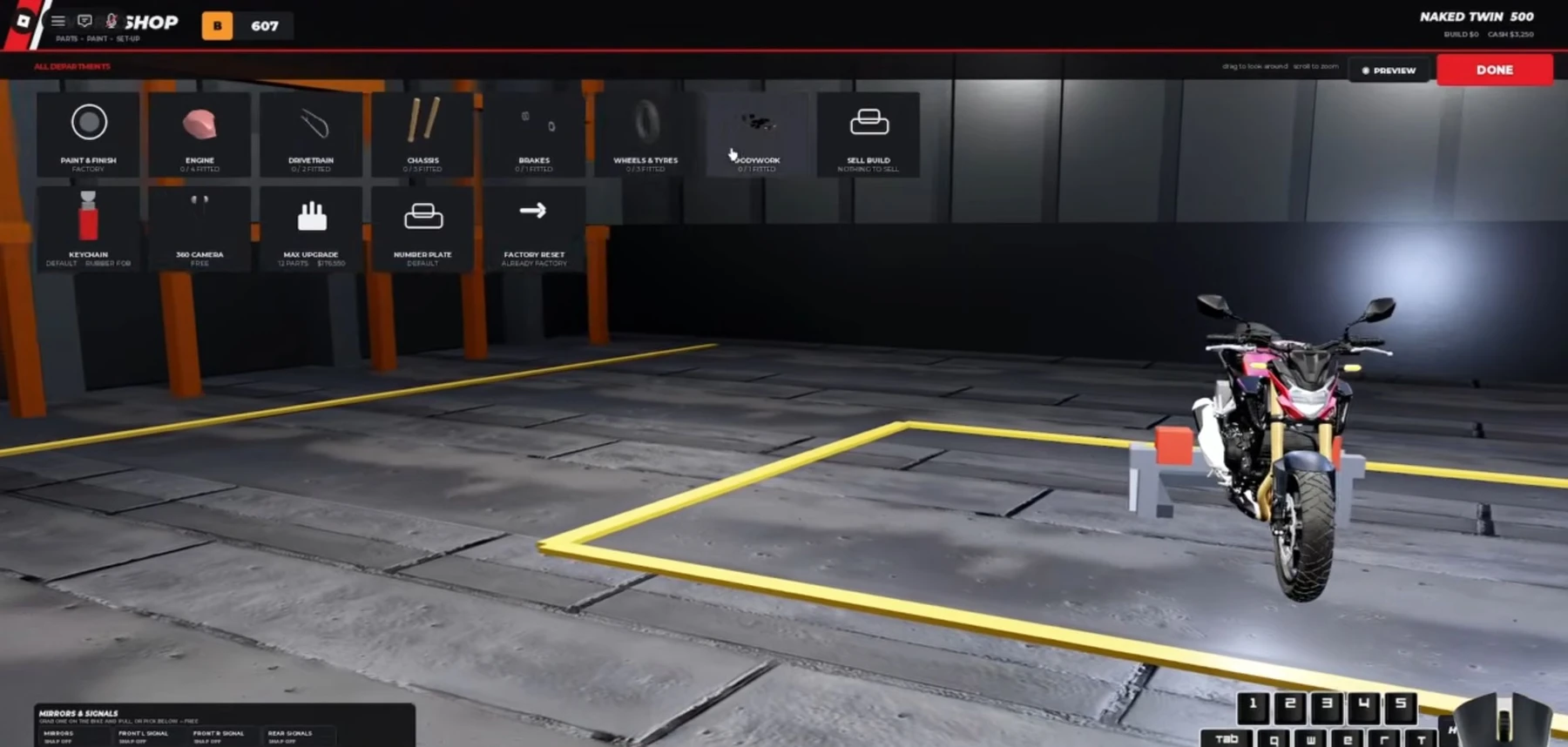
Menu analysis: ItzVexo, 0:58, October 6, 2026. These are category labels, not measured performance improvements.
At 0:58 in ItzVexo’s October 6 video, the visible categories include Engine, Drivetrain, Chassis, Brakes, Wheels & Tyres, Bodywork, and Paint.
These labels establish how the menu is organised. They do not establish an unshown part’s exact handling bonus, a universal best build or a current tier list. Keep cosmetic choices and performance claims separate when comparing advice.

ItsChalls — garage chapter at 2:59 and Sport Twin 700 popup at 3:28
Decide what you need the purchase to solve
First identify what goes wrong in your rides. Are you reacting too late, losing a line during a wheelie, or choosing gaps that are already closing? A different part cannot be assumed to fix a control problem.
Use this simple decision order:
- Repeat the relevant drill in the controls guide.
- Inspect the current part description and price.
- Buy only when its displayed effect matches the problem you want to address.
- Ride the same mode and compare results using the run comparison sheet.
This is a spending framework, not a claim that every upgrade has been tested. We have not measured acceleration, braking distance or a fastest-bike ranking.
When an older guide disagrees with your garage
Prefer the current in-game display for your purchase. Check official update status for a dated notice, and treat older video prices as historical observations. Start with the beginner guide if you are still learning the basic riding loop.

ItzVexo — garage categories at 0:58, published October 6, 2026
Reviewed October 19, 2026. We have not bought or tested these items in the current beta. The source video is embedded so you can inspect the original UI.
Related Articles
guides
WideOpen Beginner Guide: Your First Controlled Ride
Start WideOpen with a short practice routine, readable traffic gaps, and a clear plan for your first scored ride. Includes dated video references.
guides
WideOpen Controls: Wheelies, Stoppies & Practice
Learn the keyboard prompts shown in WideOpen gameplay, including Space + W wheelies, Space + S stoppies, and where to check device controls.
guides
WideOpen Money Guide: Read Your Runs Before Upgrading
Build a useful WideOpen cash routine by separating practice, scored rides, points and payouts. Compare your own runs instead of trusting invented rates.
Was this helpful?
Thanks for the feedback!