WideOpen Controls: Wheelies, Stoppies & Practice
Learn the keyboard prompts shown in WideOpen gameplay, including Space + W wheelies, Space + S stoppies, and where to check device controls.
FAQ
How do you wheelie in WideOpen on keyboard?
Does practice award points?
Keyboard prompts shown in the video
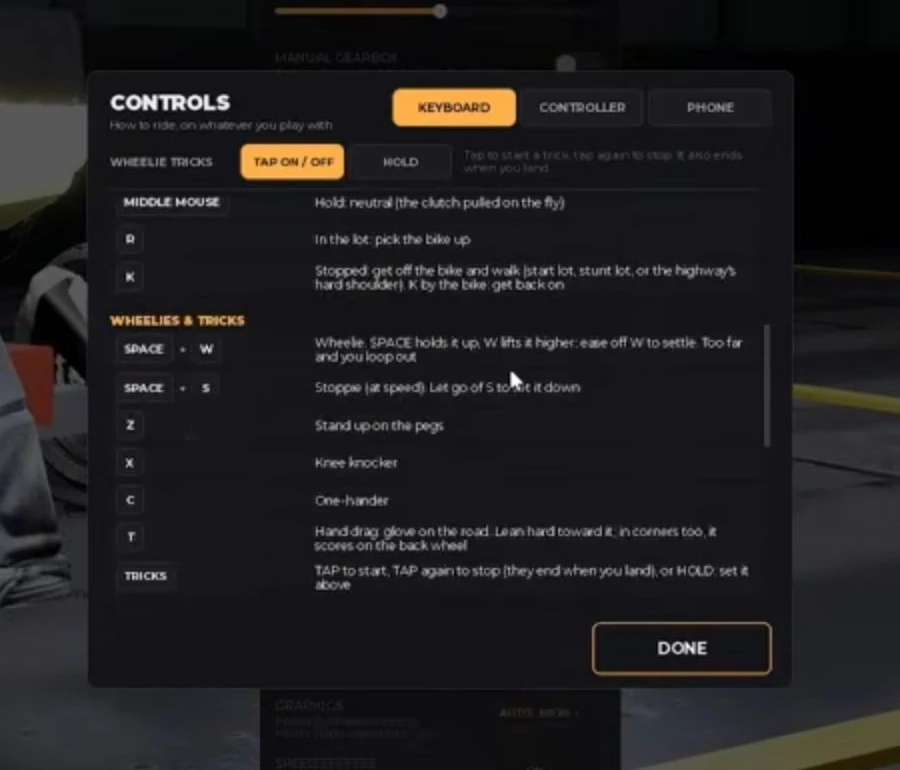
Menu analysis: ItzVexo, 1:18 in the October 6 video. The selected Keyboard tab is why these inputs are not labelled as phone controls.
The table transcribes the visible keyboard menu in ItzVexo’s video at 1:18, published October 6, 2026. These are dated menu observations, not newly tested bindings.
| Action | Visible keyboard input | How to use this reference |
|---|---|---|
| Wheelie | Space + W | Learn this first on a clear stretch. |
| Stoppie | Space + S | Practise separately before adding traffic. |
| Stand on pegs | Z | Learn after basic steering feels predictable. |
| Knee knocker | X | A trick input, not a guaranteed cash multiplier. |
| One hand | C | Keep watching the road rather than the animation. |
| Hand drag | T | Leave advanced tricks until you can control the bike. |
The menu also has Controller and Phone tabs. Their presence does not establish every device’s button mapping. Open the matching tab in your current session rather than translating keyboard keys into guessed mobile taps.
A short wheelie drill
ItsChalls’ tutorial at 0:43 displays Hold SPACE with gas on, SPACE + W, and a task to keep the wheel up for three seconds while steering with A/D. The three seconds are this tutorial task, not proof of a universal scoring threshold.
- Enter practice and read the current prompts.
- Find a clear straight section with room to correct a mistake.
- Apply the shown wheelie input and make small steering adjustments.
- Return to stable riding before trying to pass traffic.
- Repeat until you can decide when to stop, instead of holding the input until a crash.
This drill is a recommendation. We have not measured a success rate or an optimal wheelie angle.

ItsChalls — watch the keyboard wheelie tutorial at 0:43
Fix the skill that is breaking the run
If you drift across lanes, simplify the task to ordinary steering. If you can hold a wheelie but fail when cars appear, shorten the stunt and look farther ahead. If an input differs from this table, use the current game’s control menu and check beta updates.
For a broader learning order, start with the beginner guide. When you move out of practice, use the results guide to separate riding performance from cash earned. The garage checklist helps avoid buying upgrades before you understand the problem.
Source video

ItzVexo — WideOpen gameplay, published October 6, 2026; controls at 1:18
Reviewed October 19, 2026. Video and game rights remain with their respective owners; our instructions and comparisons are editorial commentary.
Related Articles
guides
WideOpen Beginner Guide: Your First Controlled Ride
Start WideOpen with a short practice routine, readable traffic gaps, and a clear plan for your first scored ride. Includes dated video references.
guides
WideOpen Money Guide: Read Your Runs Before Upgrading
Build a useful WideOpen cash routine by separating practice, scored rides, points and payouts. Compare your own runs instead of trusting invented rates.
guides
WideOpen Garage Guide: Bike Prices, Ranks & Parts
Understand the garage categories and check both cash and career requirements before buying a WideOpen motorcycle. Includes a dated Sport Twin 700 example.
Was this helpful?
Thanks for the feedback!